Keeping Adult AI Chats Private on Shared Devices
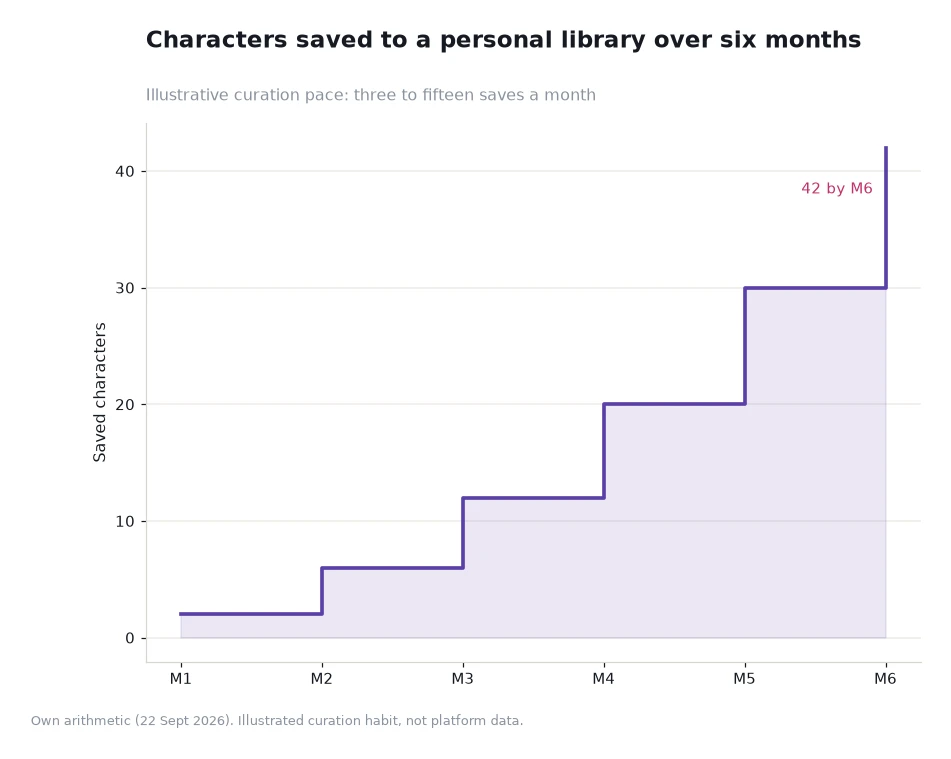
The weakest point in a private setup is rarely the platform; it is the device other people can pick up. A library built at a modest pace ends at 42 saved characters after six months, and every one of those saves is a named entry that anyone who opens the app on a shared laptop can read.

Key takeaways
- Four layers matter: a separate operating-system account, a separate browser profile, notification settings and a sign-out habit.
- Encryption in transit does nothing about a session left open on a shared screen, which is why the device layer carries most of the weight.
- Saved lists are readable artefacts. Forty-two saved characters is forty-two names, not an invisible preference.
- Set the layers up once. Hygiene you have to remember every evening fails within a fortnight.
Start with the device, not the platform
Platform wording covers the service's own handling. Crushon describes a private and secure environment with state-of-the-art encryption, and that is a statement about data moving to and from the service and about how conversations are held on its side. It is not, and cannot be, a statement about the laptop on your kitchen table.
What makes a shared device risky is not the account but the residue around it: a session that stays signed in, a browser that offers to autofill an address, a notification that previews a message on a locked screen, and a backup that quietly copies app data to a family cloud account. Each of those is solved in a different place, and none of them is solved by the platform.
Four layers you can actually control
The first layer is the operating-system account. If the device is shared regularly, a separate user account is the strongest single measure available, because it separates browser state, notifications and files at the root. The second is the browser profile: a dedicated profile with its own history and cookies means a signed-in session cannot leak into the profile everyone else uses.
The third layer is notifications. Preview text on a lock screen is the most common way private material becomes visible to someone who was not looking for it, and turning previews off is a two-minute setting change. The fourth is the habit of ending a session properly — signing out rather than closing a tab, and doing it before you hand the device over rather than remembering later.
| Layer | What it prevents | Setup cost |
|---|---|---|
| Separate OS account | Shared browser state, notifications and files | Ten minutes, once |
| Dedicated browser profile | An open session appearing in a shared window | Two minutes, once |
| Notification previews off | Message text on a lock screen in front of others | Under a minute |
| Sign out at the end of a session | Residue after you stop using the device | Seconds each time, made automatic by habit |
| Cloud backup review | App data copied to a shared family account | Five minutes, then leave it alone |
Worked example
The value of a saved library is also its exposure. Take the illustrative six-month curve: monthly additions of 2, 4, 6, 8, 10 and 12 characters, cumulative totals of 2, 6, 12, 20, 30 and 42.
Line by line, the growth is unremarkable and that is the point. Month one leaves 2 entries, month two takes it to 6, month three to 12, month four to 20, month five to 30 and month six to 42. Read as a privacy artefact rather than a collection, that is 42 persistent named records on a device you may share, each of which reveals something about what you read. Five of the six monthly steps sit inside the three-to-fifteen band the chart's subtitle describes, so no single month looks unusual — which is exactly why the total is easy to underestimate. A shared device scenario needs to account for the whole curve, not for the last month's additions.
Habits that matter more than settings
Settings hold only if they are compatible with how you actually use the device. A separate OS account that you cannot be bothered to switch into will be abandoned in a week; a browser profile that lives one click away will survive. Choose the lightest configuration that removes the exposure you care about, and test it on an ordinary evening rather than an ideal one.
Two further habits are worth more than their cost. Close sessions rather than leaving them open when you step away, because an unattended open tab is the most common exposure of all. And keep the account itself boring: a neutral username, no public activity, and nothing in a profile that ties the account to your other identities.
Account sharing is the other common failure. Two people using one login on one device removes most of the separation the four layers provide, and it also makes the saved list a shared document rather than a private one. If sharing is unavoidable, agree on a policy for the list rather than the password: what gets saved, who prunes it, and where the notes are kept.
Finally, consider what happens when someone else uses your device with permission. A friend checking a message, a family member looking something up — the layers hold as long as the session was closed before the handover. That single habit, closing rather than minimising, is the highest-value behaviour in this article and the cheapest to build.
What the platform can and cannot do for you
Read the platform's own account and keep it in proportion. Crushon's sex ai page describes a private and secure environment and encryption as a method, and it describes its Sex AI companions as adapting to your preferences over time. What none of that covers is the room you are sitting in, the profile you are signed into, or the notification that just appeared on a shared screen.
Two published pages are useful for the wider picture. The compliance statement at the 2257 compliance statement explains what the content is and is not, and the content removal policy sets out how a reader reports material. Neither is a privacy control, but both describe a service that documents its own limits, which is a better sign than a page that promises more than software can deliver.
Frequently asked questions
Is a private browser window enough on a shared device?
It depends on the device. A private window helps with local history but does not hide an open tab from someone who picks up the machine.
Does the platform's encryption protect me at home?
No. Encryption as described protects data moving to the service and stored on it. Once text is rendered on your screen, it is your device's business.
What is the single most effective change?
A separate operating-system account, if the device is regularly shared. It separates browser state, notifications and files at once.
Build the layers before you need them
Set up a profile or a separate account, turn off message previews, and make signing out part of closing a session. Those three steps take about fifteen minutes in total, and they cover the exposure a shared device creates — including the 42 saved entries a relaxed browsing habit leaves behind within six months.
References: the platform's own privacy wording on its AI sex chat page[1], plus its compliance and removal pages, all read 22 Sept 2026. The library curve is an illustrative assumption. Read 22 Sept 2026. Adults 18 and older only.